QuickVox: Mobile AI transcription and meeting recorder for professionals
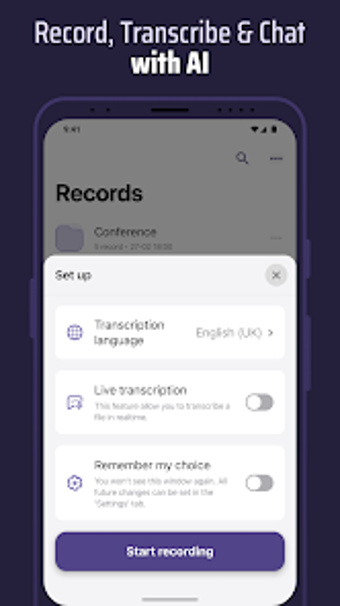
Voice & Transcribe - QuickVox, developed by B1 Group OU, is an Android app that captures spoken content and converts it into searchable text for professional documentation. It records audio, performs real-time transcription, generates AI summaries, separates speakers, and lets users 'chat' with their recordings via an integrated assistant. Key capabilities include live transcribe, multi-language recognition, audio trimming, and exportable text. The app targets business professionals, journalists, students, and creatives who need fast, editable records of meetings and interviews.
QuickVox converts spoken sessions into editable, searchable records
QuickVox functions as an intelligent voice recorder and transcription engine, designed to transform conversations, meetings, and calls into actionable text. The app produces editable transcripts that can be searched and refined in-app, and it supports outputs appropriate for notes, interviews, and meeting minutes. Primary outputs include transcribed text, trimmed audio clips, and exportable text files, which fit directly into documentation workflows without manual retyping.
It compresses meeting audio into digestible summaries and queryable transcripts
QuickVox's workflow focuses on rapid capture-to-document conversion by combining live transcription with automated summarization and an interactive assistant. The app performs live transcribe, generates AI-powered summaries of long recordings to highlight key points, and lets users query recordings through a chat interface to extract specific data or clarifications. This workflow shortens the time from meeting end to usable notes by surfacing salient items automatically.
Non-specialists can adopt it quickly, aided by in-app editing and familiar workflows
The app targets business professionals, journalists, students, and creatives, and includes built-in editing and search tools that reduce the need for specialist training. Users can trim recordings, edit transcribed text, and perform searches within saved sessions, which supports adoption by people who handle interviews or lecture notes rather than technical audio engineers. The editing controls keep post-processing inside the app, preserving the original audio alongside revised text.
Multilingual and offline features support privacy and global teams
QuickVox supports speech recognition and translation in over 100 languages, enabling multilingual transcription and instant translation between languages. It offers an offline mode that permits basic transcription and recording without an active internet connection, and speaker identification separates multiple voices in a single file for clearer dialogue structure. Export options include text files and direct sharing via email or messaging apps for straightforward handoff to colleagues.
A practical, mobile-first tool with a platform constraint
QuickVox is a capable option for mobile professionals and journalists, a position supported by its positive user reception and more than 100,000 downloads. Its Android-only availability limits teams that require cross-platform clients. For individuals and small teams working on Android devices, QuickVox provides practical efficiency for meeting and interview documentation; organizations that rely on other platforms should factor that distribution constraint into workflow choices.
Pros
Live Transcribe performs real-time speech-to-text conversion
Supports over 100 languages for transcription and translation
Offline mode permits basic transcription without internet access
Speaker identification separates multiple voices for clearer dialogues
Cons
Android-only distribution restricts cross-platform team workflows
Automated transcripts and summaries require human review for formal documents
Advanced AI interactions assume familiarity with conversational assistants
Loading…
About permissions
Before downloading, you can take a quick look at the permissions this app may request on your device. App permissions allow certain features to work properly, such as accessing your camera to take photos, your location for maps, or your storage to save files.
In this section, you’ll find a clear and simple overview of the types of permissions the app uses, grouped by their level of sensitivity, along with a visual breakdown to help you understand them at a glance. This way, you can see how the app interacts with your device and decide to download with confidence.
Permissions types
Standard
47%
Non-standard
13%
Sensitive
40%
Permissions distribution
Privacy
40%
Data collected
27%
Data shared
33%
Data safety info
Privacy
6 permissions
Permissions that allow the app to access personal or sensitive information stored on your device, such as location, contacts, camera, or microphone.
android.permission.FOREGROUND_SERVICE
Standard
android.permission.WAKE_LOCK
Standard
android.permission.RECEIVE_BOOT_COMPLETED
Standard
android.permission.VIBRATE
Standard
android.permission.USE_BIOMETRIC
Sensitive
android.permission.USE_FINGERPRINT
Sensitive
Data collected
4 permissions
Information the app may gather from your device or usage activity to enable features, personalize content, and improve overall performance.
android.permission.RECORD_AUDIO
Sensitive
android.permission.FOREGROUND_SERVICE_MICROPHONE
Non-standard
android.permission.ACCESS_NETWORK_STATE
Standard
android.permission.READ_EXTERNAL_STORAGE
Sensitive
Data shared
5 permissions
Information that may be shared with trusted third parties to provide services, support app functionality, or deliver relevant content.
android.permission.WRITE_EXTERNAL_STORAGE
Sensitive
android.permission.FOREGROUND_SERVICE_DATA_SYNC
Non-standard
android.permission.INTERNET
Standard
android.permission.POST_NOTIFICATIONS
Sensitive
android.permission.NFC
Standard
This report summarises the permissions declared by the app at the time of scanning and groups them into Privacy, Data collected and Data shared. A declared permission shows what the app can access, it does not necessarily mean personal data is collected or transmitted. For full details check the app’s privacy policy and the developer’s clarifications shown below. Softonic generates this report automatically from the package metadata; it is informational and not a substitute for a full security or privacy audit.
Laws concerning the use of this software vary from country to country. We do not encourage or condone the use of this program if it is in violation of these laws. Softonic may receive a referral fee if you click or buy any of the products featured here.